




This is tutorial for accessing external DB from assets folder. In android We can create sqlite database by using SQLite Database Browser. Now the question is how to access this database in source code. The answer is very simple. Store the database in assets folder that is placed in project folder.
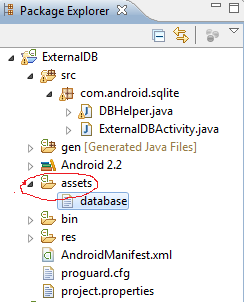
Then we can access this database in dbhelper class using
- context.getAssets().open(DB_NAME);
After this we should copy this database to our root directory. Why because our SQLiteOpenHelper reads data from root directory only. for this we have to open new empty file in root directory by using.
- private String DB_PATH = "/data/data/" + context.getPackageName() + "/" + "databases/";
- String DB_NAME = "database";
- String outFileName = DB_PATH + DB_NAME;
- OutputStream myOutput = new FileOutputStream(outFileName);
- byte[] buffer = new byte[1024];
- int length;
- while ((length = myInput.read(buffer)) > 0) {
- myOutput.write(buffer, 0, length);
- }
Now we can access our data from root directory db to our project easily. Sample project to implement external sqlite database access in android.
DBHelper.java
- package com.android.sqlite;
- import java.io.File;
- import java.io.FileOutputStream;
- import java.io.IOException;
- import java.io.InputStream;
- import java.io.OutputStream;
- import android.content.Context;
- import android.database.Cursor;
- import android.database.sqlite.SQLiteDatabase;
- import android.database.sqlite.SQLiteOpenHelper;
- public class DBHelper extends SQLiteOpenHelper {
- private static String DB_NAME = "database";
- private SQLiteDatabase db;
- private final Context context;
- private String DB_PATH;
- public DBHelper(Context context) {
- super(context, DB_NAME, null, 1);
- this.context = context;
- DB_PATH = "/data/data/" + context.getPackageName() + "/" + "databases/";
- }
- public void createDataBase() throws IOException {
- boolean dbExist = checkDataBase();
- if (dbExist) {
- } else {
- this.getReadableDatabase();
- try {
- copyDataBase();
- } catch (IOException e) {
- throw new Error("Error copying database");
- }
- }
- }
- private boolean checkDataBase() {
- File dbFile = new File(DB_PATH + DB_NAME);
- return dbFile.exists();
- }
- private void copyDataBase() throws IOException {
- InputStream myInput = context.getAssets().open(DB_NAME);
- String outFileName = DB_PATH + DB_NAME;
- OutputStream myOutput = new FileOutputStream(outFileName);
- byte[] buffer = new byte[1024];
- int length;
- while ((length = myInput.read(buffer)) > 0) {
- myOutput.write(buffer, 0, length);
- }
- // Close the streams
- myOutput.flush();
- myOutput.close();
- myInput.close();
- }
- public Cursor getData() {
- String myPath = DB_PATH + DB_NAME;
- db = SQLiteDatabase.openDatabase(myPath, null,
- SQLiteDatabase.OPEN_READONLY);
- Cursor c = db.rawQuery("SELECT * FROM master", null);
- // Note: Master is the one table in External db. Here we trying to access the records of table from external db.
- return c;
- }
- @Override
- public void onCreate(SQLiteDatabase arg0) {
- // TODO Auto-generated method stub
- }
- @Override
- public void onUpgrade(SQLiteDatabase db, int oldVersion, int newVersion) {
- // TODO Auto-generated method stub
- }
- }
And
ExternalDBActivity.java
- package com.android.sqlite;
- import java.io.IOException;
- import android.app.Activity;
- import android.database.Cursor;
- import android.os.Bundle;
- import android.widget.ListView;
- import android.widget.SimpleCursorAdapter;
- public class ExternalDBActivity extends Activity {
- /** Called when the activity is first created. */
- DBHelper dbhelper;
- @Override
- public void onCreate(Bundle savedInstanceState) {
- super.onCreate(savedInstanceState);
- setContentView(R.layout.main);
- // if you use siplecursoradapter then you should have _id as one of column name and its values should be integer in your db.
- // so "_id", "columnName1", "columnName2" are column names from your db.
- String[] from = new String[] { "_id", "columnName1", "columnName2" };
- int[] to = new int[] { R.id.TextView1, R.id.TextView2, R.id.TextView3 };
- dbhelper = new DBHelper(this);
- try {
- dbhelper.createDataBase();
- } catch (IOException e) {
- // TODO Auto-generated catch block
- e.printStackTrace();
- }
- Cursor c = dbhelper.getData();
- SimpleCursorAdapter adapter = new SimpleCursorAdapter(
- getApplicationContext(), R.layout.list, c, from, to);
- ListView list = (ListView) findViewById(R.id.ListView1);
- list.setAdapter(adapter);
- }
- }
main.xml
- <?xml version="1.0" encoding="utf-8"?<
- <LinearLayout xmlns:android="http://schemas.android.com/apk/res/android"
- android:layout_width="fill_parent"
- android:layout_height="fill_parent"
- android:orientation="vertical" <
- <ListView
- android:id="@+id/ListView1"
- android:layout_width="fill_parent"
- android:layout_height="wrap_content" <
- </ListView<
- </LinearLayout<
- <?xml version="1.0" encoding="utf-8"?>
- <LinearLayout xmlns:android="http://schemas.android.com/apk/res/android"
- android:layout_width="match_parent"
- android:layout_height="match_parent"
- android:gravity="center" >
- <TextView
- android:id="@+id/TextView1"
- android:layout_width="wrap_content"
- android:layout_height="wrap_content"
- android:layout_margin="10dp" />
- <TextView
- android:id="@+id/TextView2"
- android:layout_width="wrap_content"
- android:layout_height="wrap_content"
- android:layout_margin="10dp" />
- <TextView
- android:id="@+id/TextView3"
- android:layout_width="wrap_content"
- android:layout_height="wrap_content"
- android:layout_margin="10dp" />
- </LinearLayout>
Reduce your work by using SQLiteHelper.jar
